The Problem
WordPress has become too noisy to be usable for the average human.
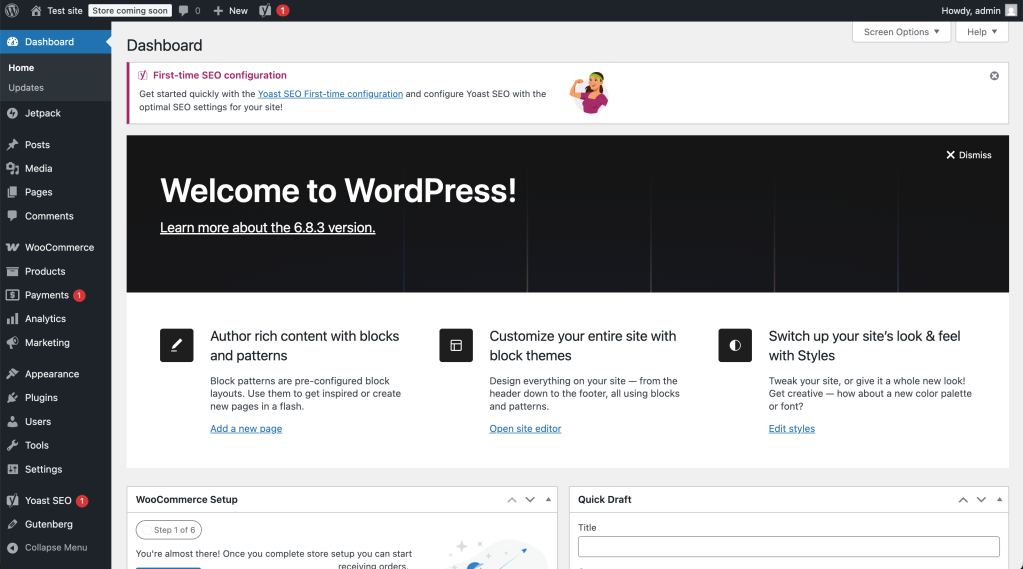
WordPress has evolved from a blogging tool to a Web Operating System. However, its interface remains a single, linear list of links that grows indefinitely as plugins are added. This results in Menu Bloat, high cognitive load, and a daunting experience for new users. A couple of additional thoughts:
- Entropy: As plugins add functionality, the sidebar becomes a chaotic mix of nouns (Posts), verbs (Tools), and utilities (Settings).
- Context Switching: A writer trying to publish a post is visually assaulted by WooCommerce order counts, SEO warnings, and backup notifications.
- The “OS” Conflict: WordPress attempts to serve two masters: Creative Design (Site Editor) and Data Management (Classic Admin). Forcing both into one view serves neither well.
The Proposal
In this post I explore the idea of adding the concept of “Workspaces” to WordPress core. Workspaces introduces a context-aware interface layer. It allows users to toggle between focused “Workspaces” (e.g., Writing, Commerce, Design, Manage) that display only the tools relevant to the current task.
Preview
Or, here’s a video of me clicking around, including the addition of a “Commerce” workspace when Woo is added:
You can preview my proof of concept plugin and take it for a spin by downloading the zip and uploading it to your WP install:
API Example: register_admin_workspace()
// Example: Distraction-free Writer workspace
register_admin_workspace( 'write', array(
	'label'            => __( 'Write', 'wp-workspaces' ),
	'sidebar_items'    => array( 'edit.php', 'upload.php', 'edit-comments.php' ),
	'admin_bar_items'  => array( 'new-post', 'new-media' ),
	'distraction_free' => true, // Blocks admin notices from plugins
	'fallback'         => false,
));
Scope
v1 Scope included in this proof of concept:
- 5 core workspaces (Default, Write, Design, Commerce, Manage)
- Commerce workspace with WooCommerce detection
- Workspace switcher in admin bar
- Sidebar filtering via CSS/JS
- Distraction free mode (set on a per workspace basis)
Outside scope (things we’d still have to address for this to work):
- `workspace.json` config file support for plugins
- User Customization/Pinning UI (“Customize” mode toggle, eye icons, pinning menu items, reset to faults)
- Accessibility features (`aria-live` announcements, focus trapping, keyboard navigation, screen ader labels)
- Transition animation
- Top bar filtering
- Dashboard card filtering
- Command Palette Integration (WP 6.3+ command palette hooks, workspace switching commands)
- Role-based awareness
- Security hardening (nonce verification, capability checks, CSRF protection, sanitization)
- Data cleanup & uninstall hooks
- Full internationalization (i18n) with translation support
- Advanced error handling & fallbacks
- JavaScript failure graceful degradation
- Conflict detection with other menu-manipulating plugins
- Developer documentation (workspace.json schema specification, hooks/filters docs, PHPDoc)
- WordPress standards compliance (minimum WP/PHP versions, WPCS, readme.txt)
- Edge case handling (pages not in any workspace, custom post types, multisite)
- Testing strategy (manual checklists, browser compatibility, plugin conflicts)
- Performance optimization (caching, asset minification, benchmarks)
- REST API endpoints
- Roll-out plan
Steelman
Sometimes it helps to think through the reasons not to do something, taking the opposite side to strengthen the argument:
- It solves a “legacy” problem: Investing heavily in the classic
wp-adminsidebar contradicts the long-term roadmap of moving everything into the Site Editor (Gutenberg). - It breaks the “universal language” of support: Millions of existing tutorials say “Go to Settings > Reading.” If users are in a workspace where “Settings” is hidden, documentation fails and support requests spike.
- The “Uncategorized” Plugin Chaos: With 60,000+ plugins, most won’t update to register a workspace immediately. This leaves users constantly switching back to “Default workspace” to find missing links, actually increasing friction.
- Core should be the OS, not the Interface: WordPress Core should provide capabilities (the engine), not opinionated workflows. Specific dashboard experiences (like “Writer workspace”) arguably belong in plugins, not the default software.
- Visibility vs. Permissions Mismatch: Hiding menu items for users who technically have permission to see them creates “UX traps” (e.g., following a direct link to a page that doesn’t exist in the current sidebar).
The Verdict: Why Workspaces Belong in Core
The argument that the Site Editor will eventually render the Dashboard obsolete is a fallacy. WordPress is no longer just a CMS; it is a Web Operating System. Like any OS, it handles two distinct types of work:
- Visual/Creative: (Design, Layout, Frontend) -> Best served by the Site Editor.
- Data/Operational: (Orders, Users, Settings) -> Best served by the Dashboard.
You cannot manage 5,000 WooCommerce orders inside a visual block editor. Data-dense tasks require a data-dense interface. Because the Admin Dashboard (wp-admin) is essential for operational work, we cannot let it drown in entropy. It requires architecture, not abandonment.
Additional reasons why this makes sense:
A) It Unifies the Experience (“Design Mode” = Site Editor)
Currently, moving between the Dashboard and the Site Editor feels jarring, like jumping between two different applications. Workspaces bridge this gap by treating the Site Editor as just another “room” in the house.
- The Shift: Instead of “leaving” the admin to go to the editor, the user simply switches to the Design Workspace.
- The Result: This helps solve the unification goal of Phase 3 without destroying the utility of the traditional dashboard.
B) It Protects “Deep Work” (Distraction-Free Contexts)
The current WordPress interface imposes a heavy “cognitive tax.” A user trying to write a blog post is visually assaulted by plugin notifications, update warnings, and e-commerce stats.
The “Flow State”: By removing visual noise, we aren’t just cleaning up the menu; we are helping users achieve a state of flow, allowing them to work faster and with higher quality.
Context Preservation: Workspaces allow users to wear one “hat” at a time. When I am in Writer Workspace, I am an author. The database settings, store analytics, and theme tools vanish. I can focus entirely on content creation.
Reduced Anxiety: For non-technical users (clients), the full admin panel is terrifying. They fear breaking something. A focused workspace removes the “dangerous” buttons, giving them the confidence to work without fear.
Conclusion
Workspaces is not a UI “skin.” It is an architectural acknowledgement that WordPress is now big enough to require departmentalization. By decoupling capabilities from visibility, and navigation from configuration, we can make WordPress 7.0 feel like a cohesive Operating System rather than a messy collection of plugins.
Thoughts?
If you have feedback, I’d love to hear it in the comments below!

 Dave Martin
Leave a comment